What I learned from the free sfdx-hardis training
The free sfdx-hardis DevOps training is the best Salesforce DevOps course I have taken. In 27 hands-on labs across three levels, you build a complete CI/CD pipeline on free Salesforce orgs, from your first user story to production releases, hotfixes and monitoring. Badges are only awarded when an automated job has verified your work in your own repository. I completed all three levels in October 2026, and even with almost two years of sfdx-hardis experience it took me nearly a full day.
Why did I take the training?
Honestly, LinkedIn made me do it. Every day more sfdx-hardis badges appeared in my feed, and every day it bothered me a little more that I didn’t have them. So I made the time.
I did not start from zero. I use sfdx-hardis in client projects, have worked with it for about two years and know Git well. I have also completed DevOps courses from Gearset, Flosum and Copado. That gave me a good comparison, and it is why I can say without hesitation that this course is top tier.
If you don’t know the tool yet, start with my introduction to sfdx-hardis. It explains what the toolkit does and how it compares to commercial platforms.
What does the sfdx-hardis training cover?
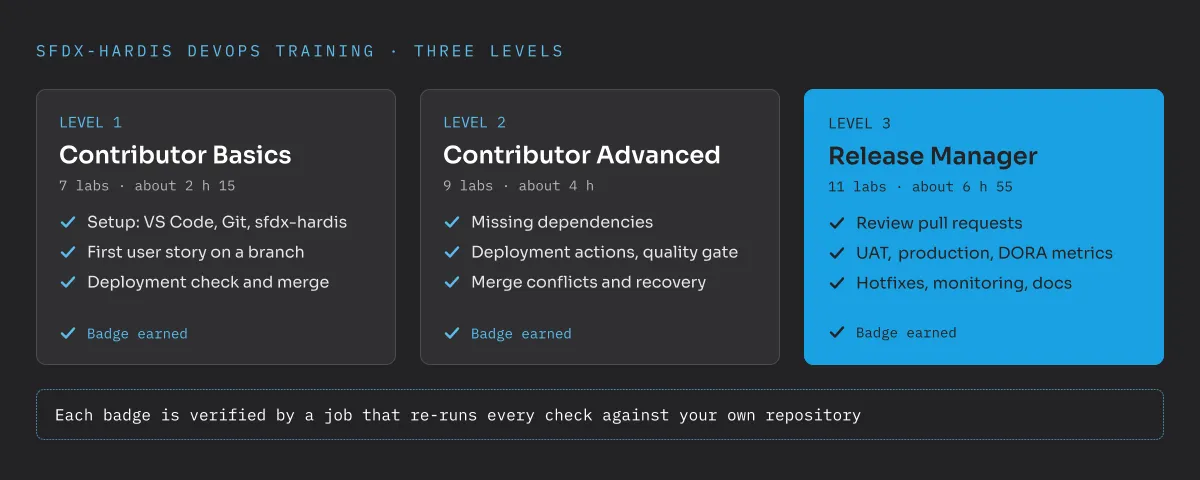
The training (opens in a new tab) is built by Cloudity and runs entirely on free resources: a GitHub account, VS Code and free Salesforce Developer Edition orgs. If you can’t install software on your machine, it also runs in a browser-based VS Code. Every lab comes with screenshots of the real screens. The course is split into two tracks and three levels:
- Level 1, Contributor Basics (7 labs, about 2 h 15): installing VS Code, Git and sfdx-hardis, setting up a Dev Hub, scratch orgs and the pipeline, working on a branch, building a custom field, publishing the change, passing the deployment check and merging.
- Level 2, Contributor Advanced (9 labs, about 4 h): fixing a missing dependency, deployment actions for data fixes and reference data, the code quality gate and Apex test coverage, permission sets and profiles, resolving a merge conflict and recovering from committing the wrong metadata.
- Level 3, Release Manager (11 labs, about 6 h 55): configuring the pipeline, reviewing pull requests, reading deployment logs, merging colliding pull requests, promoting to UAT with release notes, releasing to production with DORA metrics, hotfixes and retrofits, production monitoring, generated documentation and promotion branches.
How are the badges earned?
This is what sets the course apart. There is no multiple-choice quiz. At the end of each level, a job clones your public repository and runs every check of that level against it again. Only when everything passes do you receive the badge, which you can share on LinkedIn. Cloudity is explicit that it is a badge, not a certification. For me that is the more honest model: it proves that you actually did the work.
My three badges (opens in a new tab) were awarded on 18 and 20 October 2026, with every check passed on all three levels.
What were my five takeaways?
Even with experience, several things were new or gave me a fresh perspective:
- GitHub instead of GitLab and Azure DevOps. In my projects I had mostly used GitLab and Azure DevOps. Working through the course on GitHub was a nice change. Small detail, big smile: GitHub shows the validation status of a pull request right in the browser tab icon.
- Post-deployment steps and SFDMU in the pipeline. Running deployment actions and data loads with SFDMU, the open-source data migration plugin, through a hardis-backed pipeline shows how much manual release work can disappear from spreadsheets.
- Promotion branches. This is a new beta feature I kept asking Nicolas Vuillamy about, and then took a month to test myself. It felt like being a typical end customer.
- The DevOps Pipeline page. Instead of checking everything directly in the repository, the pipeline view in the VS Code extension shows the state of branches and environments in one place.
- DORA metrics. I looked at DORA metrics in sfdx-hardis for the first time: deployment frequency, lead time for changes, change failure rate and time to restore. These are numbers a steering committee understands.
I won’t use every feature in every project. But knowing what is available helps me give better advice and recommend the right approach for each team. For admins in particular, some of these helpers can make everyday release work much easier. And anyone who advises clients on their DevOps tooling should know the options first-hand, not only from slide decks.
Who should take the training?
I would recommend it to three groups:
- Admins and consultants who want to stop fearing Git. Levels 1 and 2 show that branches, pull requests and merge conflicts are manageable with the VS Code extension.
- Developers and tech leads who know Git but have not seen a complete Salesforce pipeline, including deployment actions, quality gates and monitoring.
- Release managers and architects who own the release process. Level 3 is the part I would make mandatory for anyone in that role, especially in programmes with several partners, where pull request reviews and a clear release rhythm make the difference.
For clients, it is also a cheap way to build internal DevOps knowledge, which is the basis for owning the release process instead of leaving it with a partner. That is a theme in most of my architecture and governance work.
What is my verdict?
Plan for a full day if you have experience and more if you don’t. It is time well spent. Work through the labs in one go rather than spread over weeks, because the levels build directly on each other and the links between branch, pull request, pipeline and org become clearest that way. The course is free, hands-on and close to real project work, and the badge means something because it is verified. Huge credit and thanks to Nicolas Vuillamy and the Cloudity team.
If you want to talk about how sfdx-hardis or a DevOps setup could work in your Salesforce programme, send me a message.
Frequently asked questions
Is the sfdx-hardis training really free?
Yes. The training is free and open source. You need a free GitHub account and free Salesforce Developer Edition orgs, no paid service, licence or credit card.
How long does the sfdx-hardis training take?
The course lists about 2 h 15 for Level 1, about 4 h for Level 2 and about 6 h 55 for Level 3. With prior experience I needed almost a day for all three.
Who is the sfdx-hardis training for?
Levels 1 and 2 are for contributors who build and deliver user stories, including admins and consultants. Level 3 is for release managers who run the pipeline up to production.
Is the sfdx-hardis badge a certification?
No. Cloudity describes it as a badge, not a certification. It proves that you completed the labs, because an automated job checks your own repository.