sfdx-hardis: open-source Salesforce DevOps explained
sfdx-hardis is a free, open-source toolkit for Salesforce DevOps. It combines a Salesforce CLI plugin with a VS Code extension and gives teams a ready-made CI/CD pipeline, delta deployments, quality checks, org monitoring, metadata backups and generated documentation. It runs on the Git platform a company already uses. I use sfdx-hardis in client projects and rate it very highly, mainly because it delivers what most enterprise programmes need without ongoing licence costs.
What is sfdx-hardis?
sfdx-hardis (opens in a new tab) is led by Nicolas Vuillamy and Cloudity, a Salesforce consultancy, together with a large community of external contributors and translators. Technically it consists of two parts:
- A Salesforce CLI plugin with commands for deployments, monitoring, documentation and project setup. These commands run locally and in the pipeline.
- A VS Code extension that puts those commands behind menus and buttons. It also works in VS Code forks such as Cursor.
The idea behind it: Salesforce DevOps should not depend on an expensive platform. Most building blocks of a good release process can be assembled from open tools, and sfdx-hardis bundles them into one consistent setup. If you are new to the topic, my article on why DevOps decides Salesforce enterprise projects explains the basics first.
A note on transparency: I support the open-source project, but I have no financial or other ties to Cloudity.
What does sfdx-hardis cover?
The scope is wider than most people expect from an open-source tool. The most important areas:
- CI/CD pipeline. A pre-configured pipeline for GitHub, GitLab, Azure DevOps, Bitbucket and Jenkins, with Docker images for the pipeline runners. Every pull request triggers a validation deployment, Apex tests and quality checks.
- Smart and delta deployments. Based on sfdx-git-delta, only changed metadata is deployed. When a deployment fails, sfdx-hardis shows tips on how to fix the error, which saves a lot of searching.
- Deployment actions. Pre- and post-deployment steps, for example data fixes or reference data loaded with SFDMU, an open-source data migration plugin for the Salesforce CLI, run as part of the pipeline instead of from a spreadsheet of manual steps.
- Quality checks. Pull request results include static analysis via MegaLinter, so code quality problems show up before the merge.
- Org monitoring and backup. Scheduled jobs back up metadata and check for things like Apex and flow errors, org limits, deprecated API versions, inactive users or unused metadata. Results go to Slack, Microsoft Teams, Google Chat or email, and can feed dashboards.
- Generated documentation. Project documentation, including flows, is generated from the repository and can be published, for example to Confluence or Salesforce.
- Ticketing integration. Jira, Azure Boards and other tools can be linked so that user stories and deployments are connected.
- DORA metrics. A report on the four DevOps metrics: deployment frequency, lead time for changes, change failure rate and time to restore.
What I like most is where all of this lives. Because sfdx-hardis runs on the client’s own Git platform, the repository, pipeline and configuration stay with the client, whichever partner builds the features.
How does sfdx-hardis compare to Gearset or Copado?
Commercial tools like Gearset or Copado have their place. They offer a managed web interface, vendor support and features like comparisons between orgs with a few clicks. For some teams that is worth the money. But there are trade-offs:
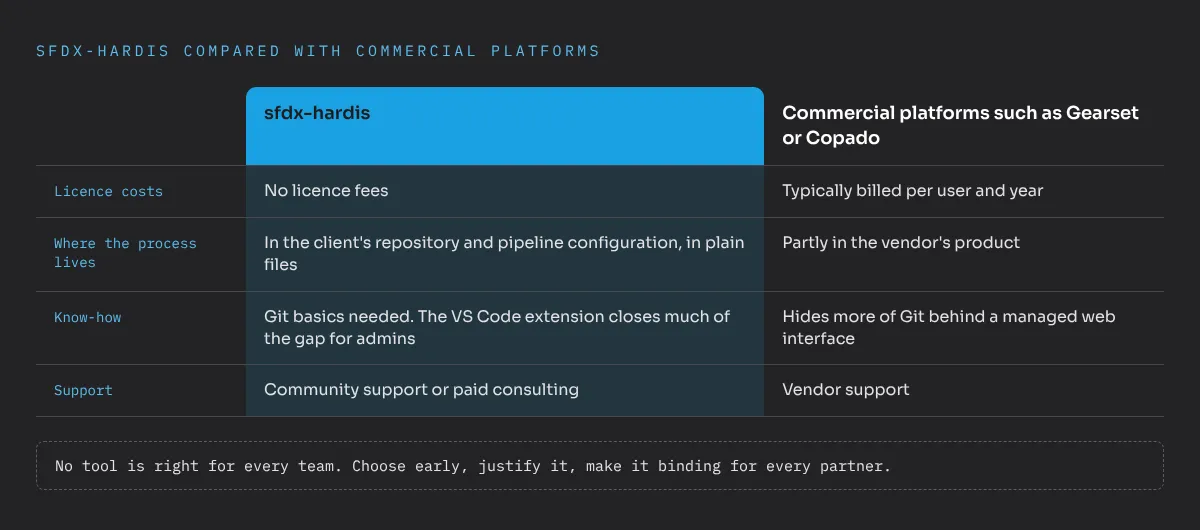
- Licence costs. Commercial platforms are typically billed per user and year. In a programme with dozens of developers and admins across several partners, that adds up quickly, and it never stops. sfdx-hardis has no licence fees.
- Where the process lives. With a commercial platform, part of the release process lives in the vendor’s product. With sfdx-hardis it lives in the client’s repository and pipeline configuration, in plain files.
- Know-how. sfdx-hardis expects the team to understand Git, branches and pipelines, at least at a basic level. A commercial platform hides more of that. The VS Code extension closes much of the gap for admins, but not all of it.
- Support. Open source means community support or paid consulting, not a vendor hotline. For most enterprise teams I work with, that is acceptable if at least one internal person owns the setup.
Salesforce’s own DevOps Center is another free option. It is a good start for click-based teams, but covers less of the pipeline, monitoring and documentation side.
What matters most to me: no tool is right for every team. The choice should be made early, justified properly and then made binding for everyone involved, including every partner. A programme where each partner brings its own tool ends up with several release processes, and therefore with none.
When is sfdx-hardis the right choice?
From my project experience, sfdx-hardis fits well when:
- several teams or partners work on the same org and need one binding release process,
- the client wants to own the process and avoid lock-in to a partner or a tool vendor,
- the client already runs GitHub, GitLab or Azure DevOps and wants the pipeline there,
- there is, or will be, at least one internal person who takes ownership of the setup,
- licence budgets are tight, or better spent on people than on per-user fees.
That last point is often underestimated. The saved licence costs are best invested in an internal role that maintains the setup, onboards new teams and owns the release calendar. Without that role, even the best tool loses its effect after a few months.
It is less suitable when nobody on the client side wants to touch Git at all, or when a team needs a fully managed tool with a contractual support line from day one. In those cases a commercial platform can be the more honest answer.
How do you get started?
The fastest way to understand sfdx-hardis is to try it, not to read about it. Cloudity offers a free, hands-on training with three levels and verified badges. I completed all three and wrote about my experience in what I learned from the free sfdx-hardis training.
For a real programme I recommend this order:
- Put the production metadata into a repository on the client’s Git platform.
- Set up the sfdx-hardis pipeline with validation on every pull request.
- Define the branch strategy and make pull request reviews mandatory.
- Move deployment steps from spreadsheets into deployment actions.
- Turn on monitoring, backups and generated documentation.
Choosing the toolchain is part of architecture and partner governance, not a side decision for developers. sfdx-hardis gives you a professional release process with no licence costs, as long as someone owns it. If you want to discuss whether it fits your programme, send me a message.
Frequently asked questions
What is sfdx-hardis?
sfdx-hardis is a free, open-source toolkit for Salesforce DevOps. It consists of a Salesforce CLI plugin and a VS Code extension and provides a ready-made CI/CD pipeline, monitoring, backups and documentation.
Is sfdx-hardis really free?
Yes. The tool itself is open source and has no licence fees. Costs come only from the Git platform and CI minutes the client already uses, and from the time to set it up and run it.
Which Git platforms does sfdx-hardis support?
sfdx-hardis supports GitHub, GitLab, Azure DevOps, Bitbucket and Jenkins, and provides Docker images for pipelines. The pipeline runs where the client's IT already works.
Is sfdx-hardis suitable for admins, not only developers?
Yes. The VS Code extension offers menus and buttons for the typical steps, so admins and consultants can work with branches, pull requests and deployments without memorising Git commands.
How does sfdx-hardis compare to Gearset or Copado?
Gearset and Copado are commercial platforms with a managed interface and support, billed per user. sfdx-hardis has no licence costs and runs on the client's own Git platform, but needs more internal know-how.