Why DevOps decides Salesforce enterprise projects
Salesforce is easy to start with. A few clicks in Setup, a change set, done. That ease is exactly why many enterprise programmes run into trouble a year later. As soon as several teams, partners and countries work on the same org, the question is no longer how to build something. It is how to get it into production safely, repeatedly and traceably. That is what DevOps is about, and in enterprise projects it decides whether a programme stays in control.
What goes wrong when a Salesforce programme grows?
In a small org, one admin knows every change. In an enterprise programme that picture is gone. I have steered programmes with up to eight project teams and more than 30 developers working on one platform. In that setting, a few things happen very reliably without a proper DevOps setup:
- Changes overwrite each other. Team A deploys a page layout, Team B deploys the same object a day later with an older version. Nobody notices until users complain.
- Nobody knows what is in production. If the org itself is the only source of truth, there is no history, no review and no easy way back.
- Releases become events. Deployments happen late in the evening, with manual pre- and post-steps in a spreadsheet, and the whole team holds its breath.
- Partners become hard to replace. If the deployment knowledge sits in the heads and tools of one implementation partner, the client depends on that partner.
None of this is a tooling problem first. It is a governance problem that tooling can solve.
Why don’t change sets scale?
Change sets are fine for small, isolated changes. For enterprise work they lack almost everything you need:
- no version history and no rollback
- no code review before a change reaches the next environment
- no automated tests or quality checks as a gate
- manual, click-based assembly that is easy to get wrong
- no way to run the same deployment repeatably across several environments
Add Salesforce’s three major releases per year, sandboxes on different release versions during preview windows, and global rollouts with country-specific requirements. Manual deployments simply can’t keep up with that.
What does good Salesforce DevOps look like?
A solid setup does not need to be complicated. In my projects these building blocks matter most:
- Git as the source of truth. All metadata lives in a repository. Every change is a commit with an author, a reason and a link to the user story.
- A defined branch and environment strategy. For example: developer sandboxes, integration, UAT, production, plus a fast path for hotfixes. Every team knows where its work goes next.
- Pull requests with review. Changes are reviewed before they move on, with a clear owner for architecture decisions.
- Automated quality gates. Validation deployments, Apex tests and static code analysis run on every pull request. A green pipeline is the requirement for a merge, not a nice-to-have.
- Delta deployments. Only what changed is deployed. That keeps deployments fast and reduces side effects.
- Monitoring and backup. Regular metadata backups and checks show changes made directly in production, outdated API versions or unused components.
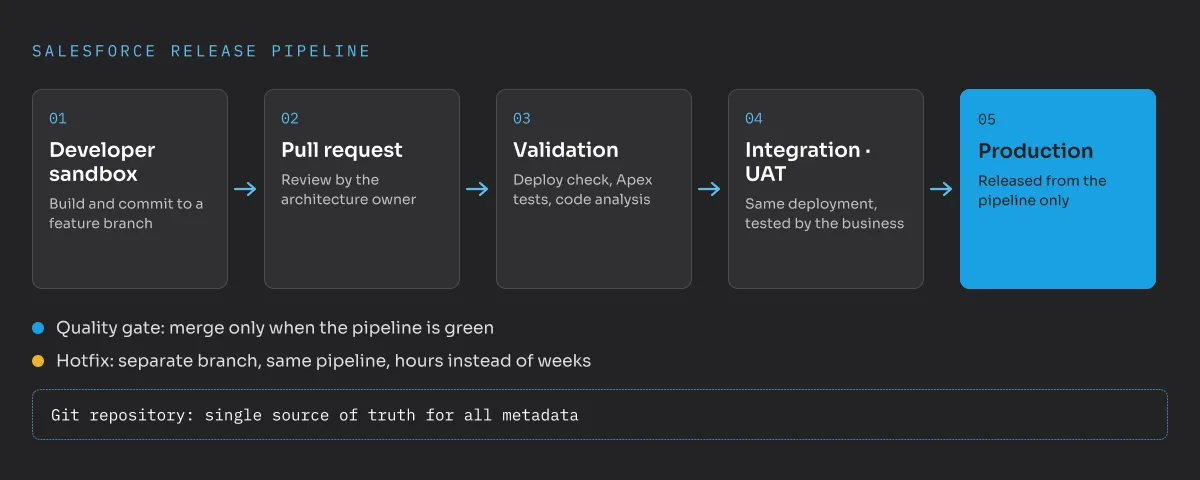
The pipeline belongs to the client, not to the partner. Whoever owns the release process owns the platform.
That last point matters a lot to me as an architect on the client side. A repository and pipeline under the client’s control make partners comparable and replaceable, which is the basis for partner steering and governance. They also make onboarding a new partner much easier, because the standards are written down and enforced automatically.
What did this look like in a real programme?
In one programme I joined, a large enterprise ran Salesforce with several implementation partners and internal teams. Nobody had clearly defined who led which processes, objects and metadata. The result was predictable:
- Changes overwrote each other, because nobody coordinated who deployed what and when.
- The technical approaches of the teams had drifted far apart, so similar problems were solved in very different ways.
- Every release was a risk, and errors often surfaced only when users ran into them.
We changed this in a few steps. First, every change went through a pull request with a review, and for a while every single one crossed my desk. Second, we wrote down development and architecture standards and enforced them in those reviews. Third, the pipeline became the only way to move changes from one org to the next. Once the process was stable, I handed it over to an internal colleague who now owns it.
The effect was clear. Results became predictable, and validation runs in the pipeline caught missing dependencies and errors before any user saw them. On top of that came the classic DevOps benefits: we could roll back, trace every change and stopped losing work.
sfdx-hardis as an open-source example
You don’t have to buy a commercial platform to get there. A good example is sfdx-hardis (opens in a new tab), an open-source toolkit maintained by Cloudity together with an active community. It bundles many of the building blocks above:
- A ready-made CI/CD pipeline for GitHub, GitLab, Azure DevOps, Bitbucket and Jenkins, so the pipeline runs where the client’s IT already works.
- Delta and smart deployments based on sfdx-git-delta, which only deploy changed metadata.
- Org monitoring and metadata backup, with notifications to Slack, Microsoft Teams or other channels.
- Generated documentation of the project, including flows, straight from the repository.
- A VS Code extension that gives admins and consultants a visual way into the Git workflow, so DevOps is not only for developers.
Salesforce’s own DevOps Center is another free option. It brings source control to teams that mostly work with clicks, but it covers less of the pipeline, monitoring and documentation side. Commercial tools like Gearset or Copado have their place too, especially when a team wants a fully managed interface. The choice depends on the team, the existing toolchain and the budget. What matters is that a decision is made early and enforced for everyone, including every partner.
What does the business side gain?
DevOps sounds like a topic for developers. In practice the business side often benefits most:
- Predictable releases. A fixed release calendar replaces “we’ll deploy when it’s ready”. Departments can plan training and communication around it.
- Faster fixes. When a bug hits production, a hotfix moves through the same tested pipeline in hours instead of waiting for the next big release.
- Fewer surprises at go-live. Every change has already been deployed and tested in integration and UAT exactly the way it will reach production.
- Traceability for audits. For every field, flow or permission you can show who changed it, when, why and who approved it.
- Lower dependency on individuals. Knowledge lives in the repository and the pipeline, not in the head of one admin or one partner’s lead developer.
For a steering committee this translates into a simple question: how confident are we that the next release will not disrupt sales or service operations? Without DevOps, the honest answer is often a guess.
Where should you start?
If your Salesforce programme still works with change sets or manual deployments, you don’t need a big-bang migration. A pragmatic order:
- Put the current production metadata into a Git repository.
- Add validation deployments and tests for every pull request.
- Define the branch and environment strategy and make it binding for all partners.
- Switch production deployments to the pipeline.
- Add monitoring, backups and generated documentation.
DevOps is not an extra layer for later. In enterprise projects it is part of the architecture, and it should be in place before the second partner starts working on the org. If you want a second opinion on your release process, send me a message.
Frequently asked questions
What is Salesforce DevOps?
Salesforce DevOps means managing all metadata changes in version control and moving them through sandboxes to production with an automated, repeatable pipeline that includes reviews, tests and quality checks.
Are change sets enough for enterprise Salesforce projects?
No. Change sets work for small, isolated changes by one admin. With several teams, partners and environments they lack version history, rollback, code review and automated tests.
Who should own the Salesforce release pipeline?
The client. A repository and pipeline under the client's control keep implementation partners comparable and replaceable and make it easier to onboard new partners.
Is sfdx-hardis free to use?
Yes. sfdx-hardis is an open-source toolkit maintained by Cloudity and its community. It runs on common CI/CD platforms such as GitHub, GitLab, Azure DevOps, Bitbucket and Jenkins.