Salesforce password integrations end in 2027: check now
Salesforce integrations that log in with a username, password and security token have an end date. On 20 February 2027, Salesforce retires the OAuth 2.0 username-password flow for connected apps, and those integrations will stop working. At the same time the SOAP API login gets stricter in several steps. For enterprise organisations with ERP connections, middleware, data loaders, backup tools and reporting extracts, this is a project with a fixed deadline, and the hardest part is finding every affected integration before it fails quietly.
What exactly changes, and when?
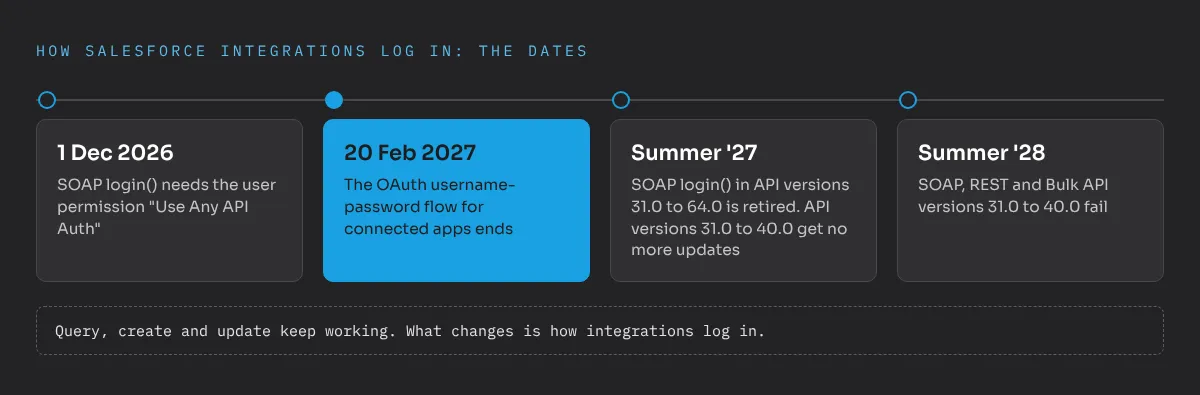
Three changes overlap, and they are easy to mix up:
- From 1 December 2026: SOAP login() needs a permission. According to Salesforce’s developer guide to the Winter ’27 release, users who authenticate with the SOAP API login() call need the user permission “Use Any API Auth”. Without it, the login is refused.
- 20 February 2027: the OAuth username-password flow ends. Integrations that request an access token with
grant_type=passwordplus username, password and security token fail from this date on. Salesforce published this as a release update (opens in a new tab) and has already moved the date once, from Winter ’27 to February 2027. - Summer ’27: SOAP login() in older API versions is retired. The SOAP login() call in API versions 31.0 to 64.0 stops working. In addition, SOAP, REST and Bulk API versions 31.0 to 40.0 receive no more updates from Summer ’27 and fail from Summer ’28.
Salesforce lists the details in its developer guide to Winter ’27 (opens in a new tab). Normal data operations through the SOAP API, such as query, create or update, continue to work. What changes is how integrations log in.
Why does this matter more in enterprise organisations?
A small org has a handful of integrations, and the admin knows them. An enterprise org has grown over years. Typical sources of password-based logins are:
- ERP and order integrations that were set up years ago by a partner who is no longer involved.
- Middleware and integration platforms where a technical user’s password sits in a configuration screen.
- Data loaders and scheduled scripts that run on a server under someone’s desk.
- Backup, archiving and reporting tools that pull data every night.
- Managed packages and connectors from vendors who decide themselves which flow they use.
The common problem: nobody has a complete list. Integrations were built by different partners, documented in different places, and often run with a technical user that several systems share. When the flow is switched off, the failure is rarely loud. A nightly job stops updating records, a report shows yesterday’s numbers, and someone notices days later when sales or service work with outdated data.
That is why I see this mainly as a governance task, not a technical one. The technical migration per integration is manageable. The risk lies in what nobody knows about.
How do you find every affected integration?
Start the inventory now, not in January. These sources complement each other:
- Login History. Create a view filtered on the login subtype “OAuth Username-Password”. It shows which users and connected apps still use the flow. Keep in mind that Login History only covers about six months. An integration that runs quarterly may not appear.
- Middleware and code. Search integration configurations, scripts and repositories for
grant_type=password, “password grant” or “ROPC”. This is where a Git repository with all integration code pays off. - Vendors. Ask every vendor of a managed package, connector or SaaS tool connected to Salesforce, in writing, which OAuth flow they use and when they will switch.
- Sandbox test. In a full or partial copy sandbox, turn off the setting “Allow OAuth Username-Password Flows” and run the integrations. What fails there would fail in production in February.
- SOAP logins. Check which integration users log in via SOAP and which API versions they use, so the December and Summer ’27 steps don’t catch you off guard.
The result should be one list: integration, purpose, owner on the client side, technical user, flow, API version, vendor or partner, migration date. That list is worth keeping after the migration, as part of the architecture documentation.
Which flow replaces the password login?
Salesforce offers several OAuth flows. For most enterprise integrations the choice comes down to three:
- Client credentials flow. The standard choice for server-to-server integrations such as middleware, ETL and backup tools. The integration authenticates with a client ID and secret and acts as a defined run-as user. No interactive login, no user password.
- JWT bearer flow. For integrations where a certificate is preferred over a shared secret, for example critical ERP connections. The integration signs a token with its private key, and Salesforce verifies it with the uploaded certificate. CI/CD pipelines that deploy to Salesforce typically use this flow too.
- Web server flow with PKCE. For applications where real users log in and act in their own name.
Salesforce recommends External Client Apps for new integrations instead of classic connected apps. One trap: simply moving a connected app to an External Client App does not solve the problem, because External Client Apps don’t support the username-password flow at all. The external system itself has to change the way it requests tokens. Salesforce Time has a good step-by-step summary (opens in a new tab) of the migration.
What about MFA?
Multi-factor authentication is the other security topic on many lists right now. Salesforce requires MFA for all users who log in through the user interface, and admins and users with elevated permissions need phishing-resistant methods such as security keys. In October there was confusion about reported delays. Salesforce clarified that there are no indefinite postponements and that individual customers with extensions will be brought into compliance over the coming months, as Salesforce Ben reported (opens in a new tab).
MFA and the OAuth retirement point in the same direction: no more shared passwords. Integration users should never log in interactively, and human users should never share accounts with integrations.
Who should own the migration?
The client. Integrations connect the client’s systems, and the credentials belong in the client’s vault, not in a partner’s configuration. In practice that means:
- A named owner per integration on the client side, even if a partner does the technical work.
- One dedicated integration user per integration, with only the permissions it needs. Shared technical users make it impossible to tell which system does what.
- Secrets and certificates in the client’s vault, rotated when a partner leaves. I explain the broader principle in why clients should own their DevOps tools.
- Changes through the normal release process, with the new connected app or External Client App configuration in the repository and deployed through the pipeline.
What should the plan look like?
A realistic order for the coming months:
- By end of November 2026: inventory complete, owners named, vendors asked.
- December 2026: check the SOAP login permission for all integration users before 1 December takes effect.
- December to January: migrate integrations to client credentials or JWT bearer, starting with the most critical ones. Test in a sandbox with the password flow disabled.
- Early February 2027: turn off the password flow in production yourself, a few days before Salesforce does, with the team on standby.
- Spring 2027: move remaining SOAP logins away from API versions below 65.0 before Summer ’27.
The deadline is fixed and the work is predictable, as long as it starts with a complete list. If you want help with the inventory or a second opinion on your integration architecture, send me a message.
Frequently asked questions
When does the Salesforce OAuth username-password flow stop working?
Salesforce enforces the retirement on 20 February 2027 for all orgs. Integrations that request a token with grant_type=password, username, password and security token will fail from then on.
What replaces the OAuth username-password flow?
For server-to-server integrations the client credentials flow with a run-as user, or the JWT bearer flow with a certificate. Apps that act for individual users should use the web server flow with PKCE.
How do I find integrations that still use the password flow?
Filter Login History by the login subtype OAuth Username-Password, search integration code and middleware configuration for grant_type=password, and ask every vendor of managed packages and connectors to confirm in writing.
Does moving to External Client Apps solve the problem?
No. External Client Apps do not support the username-password flow at all. The external system itself has to switch to a supported flow such as client credentials or JWT bearer.