Why clients should own their Salesforce DevOps tools
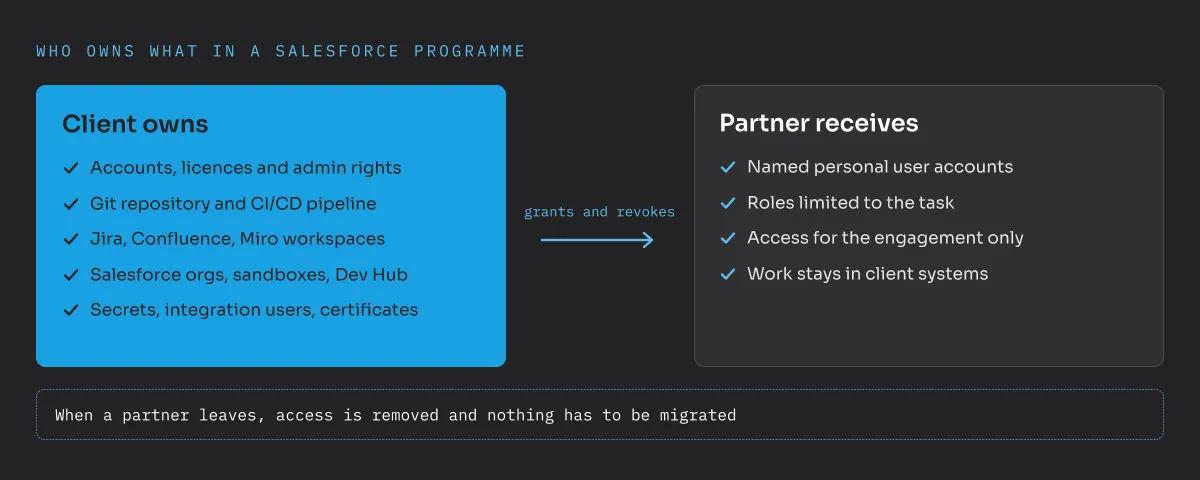
Clients should own their Salesforce DevOps tools because whoever controls the accounts, licences and access rights controls the project. That applies to the Git repository and CI/CD pipeline as much as to Jira, Confluence and Miro. Owning them does not mean running your own servers. Cloud services are fine, as long as the workspaces and admin rights belong to the client and stay with the client beyond any partnership. Partners get named accounts with the rights they need for their task.
What does it mean to own your DevOps tools?
Owning the tools means holding the keys, wherever the software runs. In practice that means:
- the contract and licences for each tool are in the client’s name,
- the admin rights sit with client employees, not only with partner staff,
- the workspace (the GitHub organisation, the Jira site, the Miro team) belongs to the client,
- partners are invited as users into the client’s workspace, not the other way round.
A GitHub organisation, a Jira Cloud site or a Miro team can be set up in an afternoon. No own servers, no infrastructure project. The difference is simply whose name is on the account and who can grant and revoke access.
Which tools are we talking about?
In a typical Salesforce programme, project knowledge and control are spread across more tools than people realise:
- Salesforce orgs, sandboxes and the Dev Hub. These usually belong to the client already. But check who holds the system administrator accounts and whether they are personal.
- Git repository and CI/CD pipeline. The repository is the history of every change, and the pipeline decides what reaches production. I explain why both are essential in my article on why DevOps decides Salesforce enterprise projects.
- Jira or Azure Boards. User stories, acceptance criteria, defects and decisions. Without them, nobody can explain later why something was built the way it was.
- Confluence or a wiki. Architecture decisions, interface descriptions, operating manuals.
- Miro or similar whiteboards. Process maps, data models and workshop results, often the only place where the target picture was ever drawn.
- Secrets and technical users. Integration users, certificates, API keys and the password vault that holds them.
Each of these can end up in a partner’s account without anyone deciding it. A partner starts quickly, uses its own Jira site and its own Git organisation, and a year later the client’s project history lives in someone else’s system.
What goes wrong when the partner owns the tools?
As long as the collaboration runs well, nobody notices. The problems appear when something changes:
- The engagement ends. Data has to be exported and migrated. Comments, links, attachments and history are often lost. Sometimes the export is simply not a priority for a partner who is leaving.
- A second partner joins. Now the new partner needs access to a competitor’s workspace, or a second set of tools appears. Standards drift and teams overwrite each other’s work.
- Partners can’t be compared. If one partner owns the repository and the pipeline, they also own the release process, and every other partner works by their rules.
- People leave. When the only admin of a tool is a partner employee who changes jobs, even the partner may struggle to regain control.
- Security and compliance. The client can’t answer simple audit questions: who has access to our source code, our requirements, our credentials?
Partners come and go. The repository, the backlog and the architecture decisions should stay.
None of this is a reproach to partners. Most good partners prefer working in the client’s tools, because it makes their own exit clean and their work visible.
What does this have to do with partner governance?
A lot. As an architect on the client side, one of my main goals is to keep implementation partners comparable and replaceable. That only works if the foundations belong to the client: the repository, the pipeline, the backlog and the documentation. Then a new partner can be onboarded into a known setup with written standards, and an exiting partner hands over nothing but their user accounts.
It also makes it possible to build internal ownership. In the programme I described in my DevOps article, the release process was eventually handed over to an internal colleague. A handover like that is only realistic when the tools and rights are already on the client side. Otherwise, the internal person inherits a process that still depends on someone else’s accounts. Ownership of tools is the basis of good partner steering and governance.
How do you set it up in practice?
Ideally, before the first partner starts. These rules have proven useful:
- Client creates the workspaces. GitHub or GitLab organisation, Jira and Confluence site, Miro team: all set up by the client, with licences in the client’s contract.
- At least two client admins per tool. Never a single admin, and never only partner staff.
- Named personal accounts only. Every partner employee gets their own account. No shared logins, so access is traceable and can be removed individually.
- Roles match the task. Developers get write access to the repository, not admin rights to the organisation. Changing pipeline and branch protection settings is reserved for the client.
- Access has an end date. Partner accounts are reviewed regularly and removed when the engagement or the person’s role ends.
- Secrets stay in the client’s vault. Integration users and certificates belong to the client and are rotated when a partner leaves.
- Write it into the contract. The statement of work says that all work products, including code, tickets and documentation, are created in the client’s tools.
If a partner already owns some of the tools, plan the move early and do it in a calm phase, not during an exit. A repository can be moved with its full history in a day. Jira and Miro take more planning, but are still far cheaper to move now than later.
Where should you start?
Make a simple list: every tool in the project, who holds the contract, who the admins are, and which partner employees have access. In many programmes that list alone shows where the risks are. Owning your tools costs little and protects the most valuable part of a Salesforce programme, its knowledge. If you want a second opinion on your setup, send me a message.
Frequently asked questions
Do clients need to host their DevOps tools on their own servers?
No. Cloud services such as GitHub, GitLab, Jira or Miro are fine. What matters is that the workspace, the licences and the admin rights belong to the client, not to an implementation partner.
Why is it a problem if the partner owns the Jira or Git workspace?
The client then depends on the partner for access, history and documentation. When the engagement ends or a second partner joins, data has to be migrated or is lost, and partners are hard to compare.
Which tools should be owned by the client?
Everything that holds project knowledge or controls releases: Salesforce orgs and Dev Hub, Git repository, CI/CD pipeline, Jira, Confluence, Miro, password vaults, integration users and certificates.
How should partners get access?
Through named personal user accounts in the client's tools, with roles limited to their task and access that ends with the engagement. Shared or anonymous accounts should not be used.