Why pull request reviews are a must in enterprise projects
A pull request review is a must in enterprise projects because it is the last point where a change can be stopped cheaply. Before a change is merged, a second person checks whether it fits the architecture, follows the agreed standards and does not break someone else’s work. In a Salesforce programme with several partners and internal teams on one org, that single step prevents more production incidents than any later test phase. It also keeps teams aligned without a meeting.
What is a pull request review?
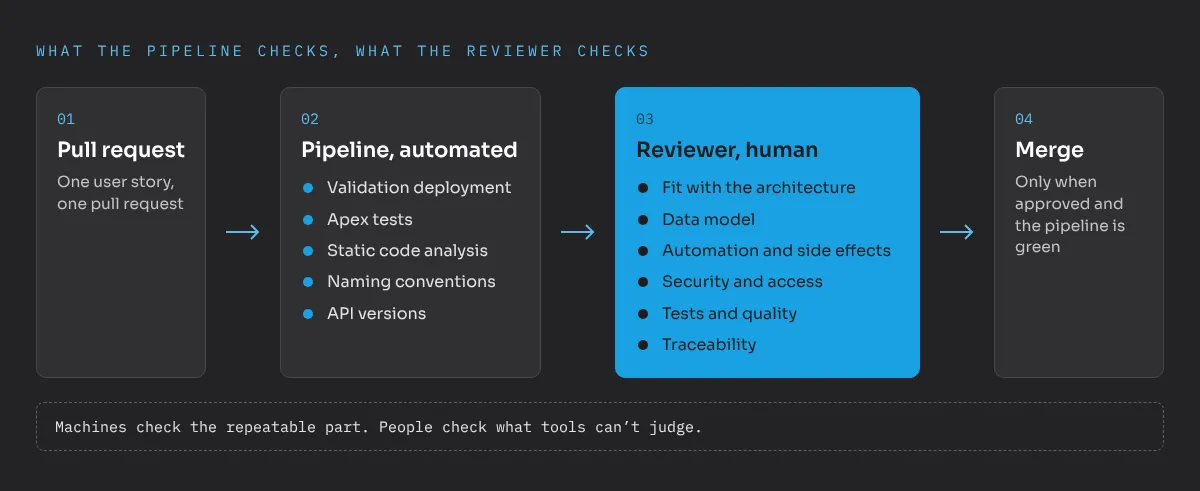
A pull request is a request to merge a set of changes from one branch into another, for example from a feature branch into the integration branch. A pull request review means that at least one other person looks at those changes and approves them before the merge. In a proper Salesforce DevOps setup the pipeline also runs a validation deployment, Apex tests and static code analysis on every pull request. Only when the review is approved and the pipeline is green can the change move on.
This works for low-code as well. Flows, page layouts, permission sets and custom fields are metadata in the repository. They appear in the pull request like any other file.
Why does an enterprise project need reviews more than a small org?
In a small org with one admin, that admin knows every change. In an enterprise programme that knowledge is spread across many people. I have worked in programmes with up to eight project teams and more than 30 developers on one platform. Without reviews, the same problems show up again and again:
- Teams overwrite each other’s work. One team changes a validation rule, another deploys an older version of the same object a day later.
- Technical approaches drift apart. One partner builds logic in Apex, another in flows, a third in a managed package. Similar problems get solved in completely different ways.
- Hidden side effects. A new trigger or flow fires on an object that another team also automates, and record saves start failing or slowing down.
- Security gaps. Permissions are granted too broadly because it is quicker, and nobody notices until an audit.
- Knowledge stays in one head. If only the author has ever seen a change, the programme depends on that person.
Every one of these is cheap to fix in a pull request and expensive to fix later. Once a change has reached UAT, several teams have built on it, testers have logged defects against it and business users have seen it.
What should a good review check?
A review is not a style check. Formatting, naming and known anti-patterns are things a machine can check faster and more reliably. The human reviewer should focus on what tools can’t judge. In my reviews I look at these points:
- Fit with the architecture. Does the change follow the agreed patterns? Is it built in the right place, for example configuration before code, one automation per object and context?
- Data model. Are new fields and objects really needed, named consistently and in line with the reporting and integration requirements?
- Automation and side effects. Which flows, triggers and validation rules already run on this object? What happens with bulk data loads or integrations?
- Security and access. Are permissions granted through permission sets, as narrow as possible? Is sharing respected in Apex?
- Tests and quality. Do the tests cover the business logic, including negative cases, or do they only push coverage over 75 percent?
- Traceability. Does the pull request link to the user story, and does the description explain why the change was made, not only what?
The repeatable part should be automated: static code analysis, naming conventions, API versions and the validation deployment. A reviewer who has to point out missing descriptions or wrong indentation has less attention left for the questions that matter.
What did reviews change in a real programme?
In one programme I joined, several implementation partners and internal teams worked on the same Salesforce org. Nobody had clearly defined who led which processes, objects and metadata. Changes overwrote each other because nobody coordinated who deployed what and when, and the technical approaches of the teams had drifted far apart.
The first and most effective step was a simple rule: every change goes through a pull request with a review. For a while, every single pull request crossed my desk. That sounds like a bottleneck, and for a few weeks it was a lot of work. But it gave us something no workshop could: a concrete view of how each team actually built things. From those reviews we wrote down development and architecture standards, and from then on the reviews enforced them.
After a few weeks the number of review comments dropped noticeably, because the teams knew the standards. Releases became predictable, and the pipeline’s validation runs caught missing dependencies before users ever saw them. Once the process was stable, I handed it over to an internal colleague and trained them, so the client now owns the review process themselves.
Reviews are how a programme with many teams agrees on one way of building things.
How do you introduce reviews without slowing down?
The most common objection is speed. In my experience reviews slow a project down only when they are introduced badly. These rules keep them fast:
- Small pull requests. One user story, one pull request. A change with 20 files is reviewed in minutes, one with 200 files is waved through or blocked for days.
- Agreed response times. For example, a first review within one working day. Then nobody waits in uncertainty.
- Clear ownership. Define who may approve what. Architecture-relevant changes such as new objects, integrations or sharing changes need approval from the client’s architect. Smaller changes can be reviewed by another developer.
- Written standards. Reviewers refer to a document, not to personal taste. That makes comments easier to accept and faster to resolve.
- Automation first. Merging is technically blocked until the pipeline is green. The reviewer only looks at changes that have already passed the automated checks.
- Reviews as knowledge transfer. Junior developers and new partners learn the standards fastest by reading and receiving reviews.
Who should own the review process?
The client. This matters to me as an architect on the client side. If one implementation partner owns the review rules, that partner decides how everyone else builds, including its competitors. When the client owns the rules and the approval for architecture-relevant changes, partners stay comparable and replaceable. That is the basis of good partner steering and governance.
This does not mean the client has to review every line personally. Partners can and should review each other’s work. But the standards, the approval rights and the repository should sit with the client, ideally with an internal person who takes over the process long term.
Where should you start?
If your programme still merges or deploys without reviews, start small:
- Protect the main branches so that nobody can merge without an approved pull request.
- Add the automated checks to every pull request: validation deployment, Apex tests, code analysis.
- Write down the ten most important development standards. That is enough for a start.
- Define who approves what, and agree on a response time.
- Review the first weeks centrally, then spread the responsibility.
Pull request reviews cost minutes per change and save days per release. If you want to talk about how to introduce them in your programme, send me a message.
Frequently asked questions
What is a pull request review?
A pull request review means that a second person checks a change before it is merged into a shared branch and deployed further. Only approved changes with a green pipeline move on.
Do pull request reviews slow down Salesforce projects?
Not when pull requests are small and response times are agreed. A review takes minutes, while fixing an unreviewed change in UAT or production often takes days and involves several teams.
Who should review pull requests in a multi-partner programme?
The client side should own the review rules and approve architecture-relevant changes. Partners can review each other, but the final say on standards should not sit with one implementation partner.
Can low-code changes like flows be reviewed?
Yes. Flows, page layouts, permission sets and custom fields are metadata in the repository and show up in the pull request like code. Reviewers check them for naming, logic, performance and security.