Salesforce Release Schedule and What IT Checks Each Time

Salesforce rolls out a major release three times a year and you do not set the timing yourself. Salesforce plans the releases for February, June and October, and depending on the instance, production upgrades can start the month before. For IT leaders, the schedule sets the rhythm for six checks: release notes, release updates, a regression test in a preview sandbox, interfaces and installed packages, communication to the business and a check after the upgrade. This article shows the sequence using Winter ’27, what each check should deliver and the dates to prepare for Spring ’27 now.
How does a Salesforce release work?
According to the Salesforce FAQ on the release schedule1, new features arrive three times a year with the Spring, Summer and Winter releases. Salesforce schedules upgrades in maintenance windows per instance, generally at off-peak times and at weekends. Salesforce publishes the maintenance schedule one year in advance.
The sequence is similar for each release, although dates and lead times vary. For Winter ’27, it looked like this according to the Salesforce Admin blog2:
- Sign-up for pre-release orgs
- Release notes published
- Sandbox refresh cutoff
- Sandbox preview begins
- First production instances, more on 2 and 9 October
So between the release notes and the last production date there were about seven weeks, and for the first instances only just over two. If you only read what changes after your production date, there is no buffer left.
Use a preview sandbox to test your configuration on the next release
Salesforce offers several ways to see a release early, and they do different jobs. The deciding question is whether your own configuration runs on the new release.
Three environments around a Salesforce release
Which release a sandbox gets depends on its instance. According to the sandbox preview instructions3, sandboxes on preview instances are upgraded early, for Winter ’27 on 28 and 29 August. Sandboxes on other instances stay on the old release and are upgraded with production. Your production org also sits on an instance with its own date, listed in the maintenance calendar on Salesforce Trust.
So first check the release type of every sandbox in Setup. Often no refresh is needed. If one is, it has to be completed before the cutoff, not just started, and it replaces the sandbox’s current content, so save sandbox-only data and configuration beforehand. Keep at least one sandbox on the preview. If development or hotfixes have to continue against production, plan a second one on the current release.
If partners develop for you, the agreement should say who runs the tests in the preview sandbox and by when results are due. Without an explicit owner and deadline, testing stays incomplete or is done twice by different partners.
Which checks should IT leaders require for each release?
Each check needs an owner, a date and a result that IT leaders can ask for:
Six checks per release
For the release notes, filter by the products the org actually uses. Then mark three kinds of change: what users see, what can break your own customisations and what is being switched off. An example for the pipeline is in Salesforce Winter ’27: what changes for your pipeline.
Release updates in Setup show platform changes that may need action from you before Salesforce enforces them. Check the enforcement status and the date by which you have to complete the steps, and use the test run in a sandbox where Salesforce offers one. Schedules can move, so look again shortly before production.
In the regression test, the processes that count are the ones the company earns money or serves customers with. For manufacturers, these are usually chains across several systems: from quote to ERP order, from installed base via service case to work order, spare parts with an availability check, and the technician app that also has to work offline. Keep the test cases from release to release, so the next run goes faster. Automated tests for the most important flows pay off here, because they run three times a year against a release you did not build yourself. The mobile app in field service has its own rhythm, which I describe in Field Service app updates: test every version.
For interfaces, check API versions, logins, connected apps and installed packages, with the owners of the systems on the other side and the package vendors.
For communication, a forwarded email from Salesforce is rarely enough. What the business needs to know is described in communicating Salesforce releases to the business.
Salesforce releases need their own path in your release governance
Salesforce’s releases belong in your release governance, but they need their own path: the date is set by Salesforce, and your team can neither stop nor roll back the platform upgrade. In one programme I built the release process. At first, every pull request went across my desk. Once the process was stable, I handed it over to an internal colleague.
The same principle works for the Salesforce releases: owners, dates and decision points instead of an ad hoc event every four months. Put the three releases into your release planning as fixed dates. Keep risky deployments of your own out of the upgrade weekend and the smoke test after it, and capture a baseline before the upgrade. That makes changes easier to compare and narrows down possible causes when something fails. DORA metrics for Salesforce help measure throughput and instability of your own delivery over time. How I set up release processes with clients is described under DevOps and release management.
Spring ’27: preview on 8 January, production from 16 January
As of 6 November 2026, the Salesforce Sandbox Preview Guide4 names 8 January 2027 as the start of the Spring ’27 preview. The maintenance calendar on Trust5 lists three production weekends.
- Sandbox preview begins
- First production instances
- Second production weekend
- Third production weekend
The first wave needs the earliest preparation: orgs upgraded on 16 January have only eight days between the start of the preview and production, and those days follow the Christmas holidays. Salesforce has not yet announced the date of the release notes or the sandbox refresh cutoff.
Which of the three weekends applies to your org takes two steps. First, look up the instance in Setup under Company Information:
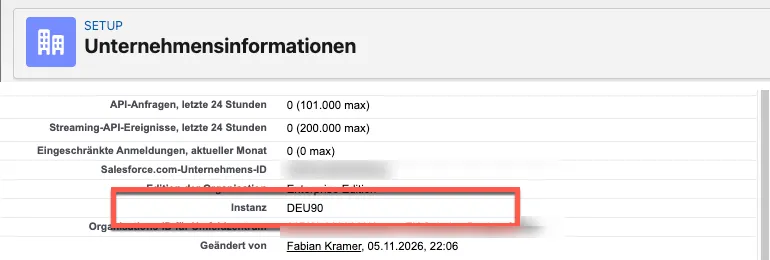
Then open that instance on Salesforce Trust5 and switch to the Maintenances tab. It lists every major release with its date:
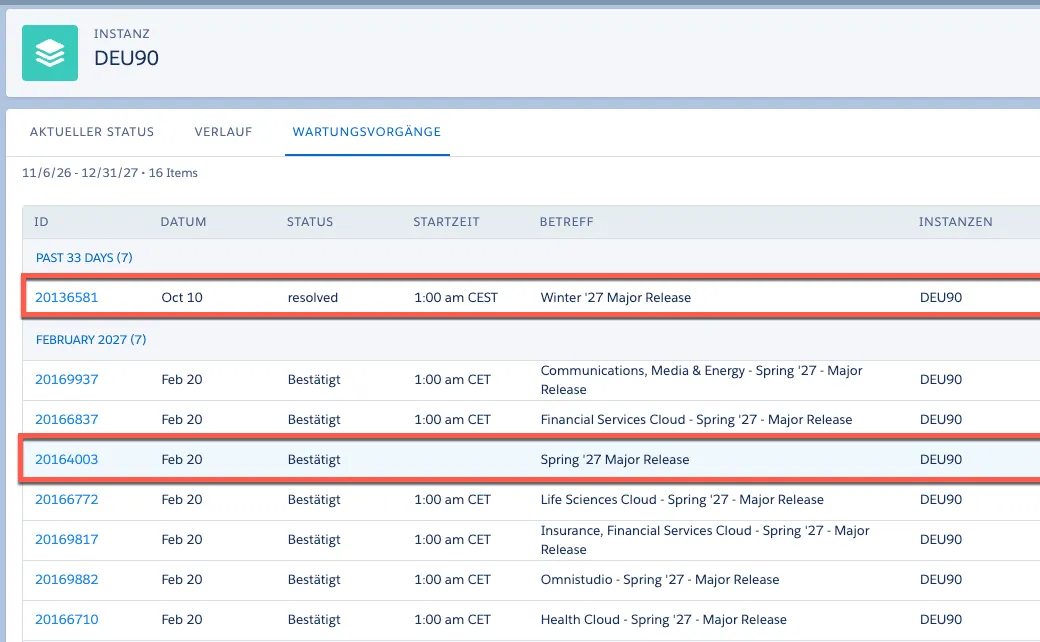
In this example, the org on DEU90 is in the last wave and gets Spring ’27 on 20 February. For the release planning, that date counts, not the first production weekend.
Fix the sandbox plan for Spring ’27 in December
Look up your production instance in Setup and its date on Trust first, so you know whether you are in the January wave. Then decide in December which sandbox goes on the preview for Spring ’27 and which stays on the current release. Check each sandbox’s release type in Setup, confirm the recommended action for its instance in the Sandbox Preview Guide and plan a refresh only where it is needed. Name an owner for each of the six checks and put the dates into the team calendar as soon as Salesforce announces the release notes.
Sources5
- 1Salesforce FAQ on the release schedule (opens in a new tab)help.salesforce.com
- 2Salesforce Admin blog (opens in a new tab)admin.salesforce.com
- 3sandbox preview instructions (opens in a new tab)help.salesforce.com
- 4Salesforce Sandbox Preview Guide (opens in a new tab)sandbox-preview-prd-24f76e67b11e.herokuapp.com
- 5maintenance calendar on Trust (opens in a new tab)status.salesforce.com
Frequently asked questions
How often does Salesforce release?
Three times a year. Salesforce plans the releases for February, June and October. Depending on the instance, production upgrades can already start in January, May or September.
When are the Salesforce release notes published?
Salesforce announces the date for each release separately. For Winter '27, the release notes came out on 19 August 2026, 16 days before the first production weekend on 4 September.
What is the Salesforce sandbox preview?
Sandboxes on preview instances get the new release before production, according to Salesforce usually four to five weeks before the release. This lets you test your own configuration against the release. Whether a sandbox is on preview depends on its instance; check the release type in Setup before you decide on a refresh.
When is Salesforce Spring '27?
The sandbox preview starts on 8 January 2027, according to the Salesforce Sandbox Preview Guide. The Trust maintenance calendar lists three production weekends: 16 January, 6 February and 20 February 2027. Which one applies depends on your org's instance.