06 · Make-or-buy & license forecasts
Salesforce make-or-buy and licence forecasts
Not everything belongs in Salesforce, and not every Salesforce product pays off. I assess make-or-buy decisions and licence needs before the contract is signed, based on a long-term ROI that includes maintenance and follow-up costs.
Book a call (opens Microsoft Bookings in a new tab)Typical situation
- A partner or the vendor proposes an industry cloud, and the company wants to know whether a custom solution on the core platform would do the job.
- A tool decision is due, for example for document generation or e-signatures, and the options inside and outside Salesforce look similar on paper.
- The question is whether an AI use case with Agentforce pays off or whether the data is not ready yet.
- A licence renewal or a new offer is on the table, and nobody has checked which licence types the users really need.
What I do
- Make-or-buy assessment with options, criteria and a recommendation
- ROI case over several years, including licences, implementation, maintenance and follow-up costs
- Licence forecast per user group, based on what users actually do in the system
- Review of Salesforce offers and preparation for the negotiation
- Roadmap of the products the company is likely to need in the next two to three years
What you get
- Decisions based on long-term costs, not only on the first-year price
- Licence types that match the users, without paying for unused features
- A clear position for negotiations with the vendor
- Fewer tools and products that were bought and never used
How we work together
- 01
Requirements and options
I write down what the business needs and which options exist: standard product, industry cloud, custom build on the platform or a separate tool.
- 02
ROI case
For each option I calculate costs and benefits over several years, including licences, implementation, maintenance, upgrades and the effort to change course later.
- 03
Licence forecast
I group users by what they do in the system and map them to licence types. The result is a forecast that can be compared with the vendor's offer.
- 04
Decision and negotiation
The recommendation goes to the decision makers with the reasons behind it. If it leads to a Salesforce offer, I help prepare the negotiation.
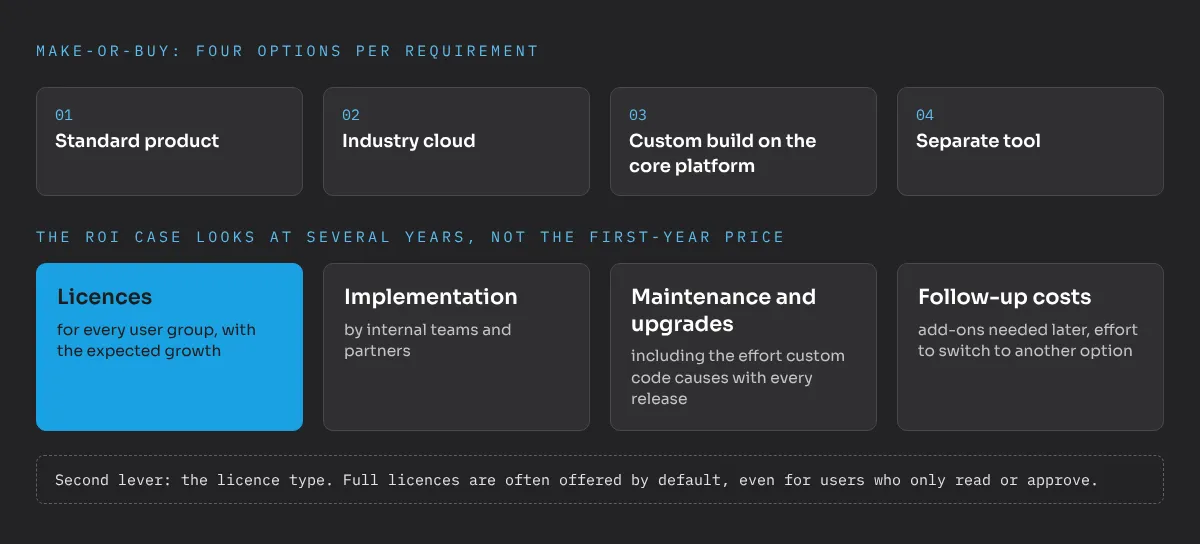
Make-or-buy on Salesforce means deciding, for each requirement, whether it is covered by a standard product, an industry cloud, a custom build on the core platform or a separate tool. Licence forecasting answers the related question of which licence types the users really need. Both decisions are made early and are expensive to reverse, so I base them on a long-term ROI case that includes maintenance and follow-up costs. I know the Salesforce licence model and pricing well from pre-sales work together with Salesforce.
When does an industry cloud pay off?
Industry clouds bring data models and processes for a specific sector. They pay off when those processes match how the company works. If they do not, the company pays for features it does not use and builds around the ones that do not fit. In one manufacturing project, sales agreements, a core feature of Manufacturing Cloud, were not relevant for the business. A custom solution on the core platform was cheaper and simpler to maintain.
The same logic applies beyond Salesforce products. Document generation, e-signatures, telephony and AI use cases all raise the question whether to buy, build or leave it in another system. For AI the most important input is the state of the data, as I explain in Agentforce: business value and data quality first. Open-source tools can change the math too, for example in DevOps, as described in why clients should own their DevOps tools.
How do I calculate the ROI case?
The first-year price is the least interesting number. I look at several years and include:
- Licences for every user group, with the expected growth.
- Implementation by internal teams and partners.
- Maintenance and upgrades, including the effort that custom code causes with every Salesforce release.
- Follow-up costs, such as add-ons that become necessary later or the effort to switch to another option.
What should you know about Salesforce licences?
The list price is rarely the final offer. Timing matters: at the end of the vendor’s fiscal year or during promotions, there is often room to include products the company will need in the next two to three years for little extra cost. That requires a roadmap that is clear enough to know what to ask for.
The second lever is the licence type. Full licences are often offered by default, even for users who only read data or approve records. Across a large user base, the difference between the right and the default licence mix can easily reach six figures per year.
Make-or-buy decisions shape the architecture, so this service often goes together with Salesforce architecture and solution design. If you have an offer or a tool decision on the table, send me a message.
Frequently asked questions
When is a custom solution better than a Salesforce industry cloud?
When the industry cloud's core features do not match how the company works. In one manufacturing project, sales agreements, a central feature of Manufacturing Cloud, were not relevant for the business, so a custom solution on the core platform was the better choice. The ROI case decides, including maintenance over several years.
Is the Salesforce list price the final price?
Usually not. The list price is a starting point. Timing matters as well: at the end of the vendor's fiscal year or during promotions there is often room to include products from the next two to three years of the roadmap for little extra cost. That only works if the company knows its roadmap.
Do all users need a full Salesforce licence?
Often not. Full licences tend to be offered by default, even for users who only read data, approve records or work in a narrow process. For large user groups the difference can easily reach six figures per year, which is why I base the forecast on what users actually do.
Do you also assess tools outside Salesforce?
Yes. Make-or-buy applies to the whole IT stack, for example document generation, e-signatures or the question whether a process belongs in Salesforce at all. I have no ties to any vendor, so the recommendation can also be a tool outside the Salesforce ecosystem.