Salesforce Service Documents: is Document Builder enough?
Salesforce Service Documents are the PDFs that Field Service creates from a work order or a service appointment: the service report with working time, spare parts, photos and the customer’s signature. The templates are built in Document Builder, which comes with the Field Service licences at no extra cost. For the classic service report on site, also offline, that is the right choice. For inspection reports with conditional logic, documents on the asset, Word output or batch runs it is not enough, and you need Salesforce Document Generation or a tool from the AppExchange.
What are Salesforce Service Documents?
A Service Document is a PDF that Salesforce Field Service generates for one of three records: a work order, a work order line item or a service appointment. Salesforce stores the result as a service report record on the job, so the document sits where the dispatcher and the back office look for it.
Document Builder is the editor for the templates. It runs inside the Lightning App Builder and works with drag and drop: standard components for fields, tables of related records, image galleries and signature blocks. When a standard component is not enough, developers can build their own Lightning Web Components. Salesforce points out that these need their own print styling, so components from the mobile app cannot simply be reused.
Salesforce introduced Service Documents in the Spring ’24 release. The matching action createServiceDocument is available from API version 60.0, which means you can also trigger documents from a flow or through the REST API. The developer documentation for the action (opens in a new tab) also lists quote document types. The reason is that Salesforce uses the same technology for quote PDFs in Revenue Cloud.
Do not confuse the name with S-Docs. S-Docs is a separate product on the AppExchange and has nothing to do with this feature.
What does Document Builder cost?
Nothing extra, as long as Field Service is licensed. According to the Salesforce Help on permissions (opens in a new tab), users need either the Field Service Dispatcher or the Field Service Mobile permission set licence. Contractor and Contractor+ licences are excluded, which matters if you plan to give documents to subcontractors.
The volume is limited. Each user with a Dispatcher, Dispatcher Plus or Mobile licence gets 250 documents per month. If the org needs more, there is a one-time extra allowance of 10,000 documents. A quick calculation: a technician with five jobs a day and 21 working days creates about 105 reports a month. That is well below the limit. It gets tight when every job produces several documents, for example a service report plus a checklist plus a corrected version after the customer complained.
Setup takes about an hour. You create a permission set without a licence, activate the system permissions “Document Builder” and “Lightning SDK for Field Service Mobile”, and assign it to dispatchers and technicians. The template field also has to be on the page layouts of work order and service appointment, otherwise nobody can pick a template.
What can Service Documents do in the field?
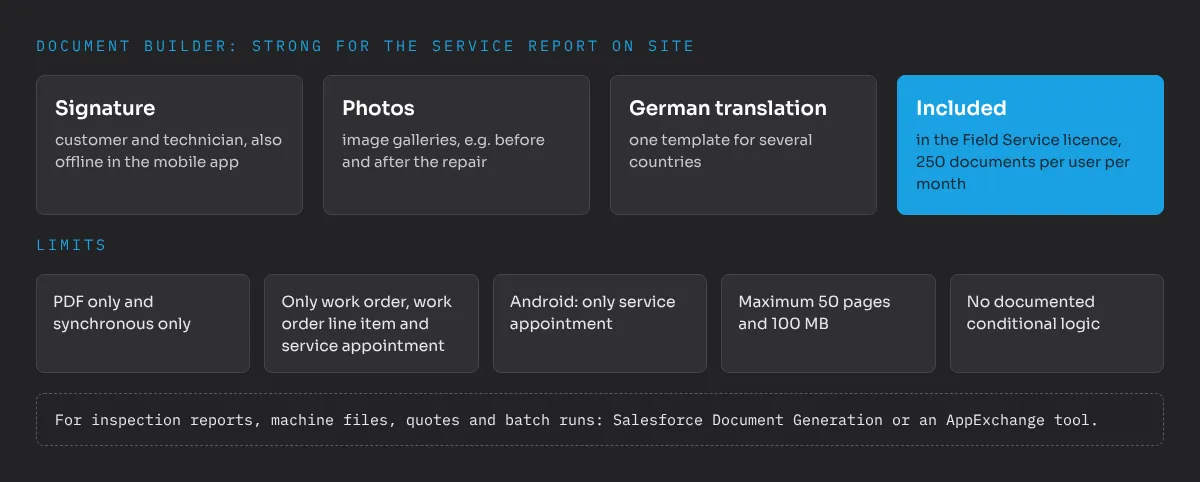
The strength of Document Builder is the moment at the customer’s machine:
- Offline creation. Technicians create the document in the Field Service mobile app, also without a connection. In a factory hall or a basement plant room that happens every day.
- Signatures. Each template supports signature types such as customer and technician. If two people of the same role have to sign, you number the types (Customer1, Customer2).
- Photos. Image galleries show what the technician photographed, for example the state before and after the repair.
- Related records. Tables show up to 1,000 related records, for example the spare parts used or the work steps.
- Translations. Templates can be translated into many languages, German included. For manufacturers with service teams in several countries that saves separate templates per language.
Where are the limits of Document Builder?
The Field Service limits page (opens in a new tab) lists them. The ones that matter in manufacturing projects:
- Only three objects. Templates exist for work order, work order line item and service appointment. A maintenance record on the asset or a document on a custom object is not possible.
- Android is behind. On iOS technicians can use work order and service appointment templates, on Android only service appointment templates. If your technicians use Android devices, your template strategy has to follow that.
- The wrong template on mobile. When a technician creates a document from the work order on a mobile device, the app offers the service appointment template. Plan for it in the training, or build only service appointment templates.
- PDF only, synchronous only. No Word output, no batch runs, for example to send all maintenance reports of a contract at the end of a quarter.
- Size. At most 50 pages and 100 MB per document. Enough for a service report, too little for the documentation of a whole production line.
- Display gaps. Lookup fields in related lists show record IDs instead of names, image URLs are not rendered, rich text prints only in black, long text fields cannot be used in related lists. Formula fields often help, but you have to know it before the template workshop.
- Translation. In rich text only custom labels are translated. Right-to-left layouts are not supported.
What I miss most is conditional logic. Salesforce does not document conditional sections like “show the pressure test only for this machine type”. If your inspection reports work like that today, Document Builder will not reproduce them. Five smaller gaps, from template choice to email, can be closed with flows and components; I describe them in Document Builder: five limits and workarounds.
What I see in tool selections
I regularly support clients in make-or-buy decisions, and document generation with e-signature is one of the recurring topics. My approach is the same every time: first an inventory of all documents with volume, data source and who signs, then the long-term cost. That means licences for every user group, implementation, maintenance with every Salesforce release and the follow-up costs if you have to switch later.
Applied to Field Service, the inventory splits into two groups. The service report from the field is the large group by volume, and Document Builder covers it. The smaller group contains the documents with logic: inspection reports, certificates, quotes, contract documents. For this group a second tool is often justified. The mistake I want to avoid is buying the large tool for everything because of the small group, and paying licences for every technician who only ever needs the service report.
Field Service itself pays off most when there are many short jobs, where scheduling and route optimisation improve the numbers. These are also the organisations with the most service reports, so the standard covers the bulk of the volume exactly where Field Service fits best.
Which alternative fits which document?
- Classic service reports. The older template editor in Field Service. Proven and simple, up to 20 signature blocks, but little design freedom. Section titles cannot be translated and the action is not available in the Salesforce mobile app.
- Salesforce Document Generation. Word templates with tokens and conditional sections, for all standard and custom objects, output as PDF, DOCX or PPTX, synchronous and batch, DocuSign integration. Not available offline or on mobile. It needs its own licence; Salesforce compares the two in the help article on Document Builder and Document Generation (opens in a new tab).
- OmniStudio Document Generation. Like Document Generation, plus external data through DataRaptors and Integration Procedures. Requires OmniStudio, which comes with the industry clouds and some Revenue Cloud editions.
- AppExchange tools such as S-Docs, Conga Composer or Nintex DocGen. Mature template logic, many formats, e-signature connectors. They cost extra per user and add a tool to your operations. Check offline support and prices with the vendor before you decide.
The combination that often makes sense: Document Builder for everything the technician creates on site, and one document generation tool for the office, licensed only for the users who need it.
How should you start?
- Collect your current reports. Every paper form and every PDF your technicians and the service office create today, with the volume per month.
- Check them against the limits above. Object, conditional logic, page count, output format, who signs.
- Check your devices. iOS or Android decides which templates you can use on mobile.
- Build one template in Document Builder, usually the standard service report, and test it with two technicians in a real job, including offline.
- Only then plan a second tool, for the documents that failed in step 2, and calculate it over several years instead of the first-year price.
In most Field Service projects the standard covers the service report, and the extra tool is justified for a short list of documents with logic. If you want a second opinion on your document mix or on Field Service architecture, send me a message. More on what the new mobile features mean for technicians is in my article on guided work and voice in Field Service.
Frequently asked questions
What are Salesforce Service Documents?
Service Documents are PDF documents that Salesforce Field Service creates for a work order, work order line item or service appointment. The templates are designed in Document Builder, and the result is stored as a service report record on the job.
Does Document Builder cost extra in Field Service?
No. Document Builder comes with the Field Service Dispatcher and Field Service Mobile permission set licences and includes 250 documents per user per month. Contractor and Contractor+ licences cannot use it.
Do Service Documents work offline in the Field Service mobile app?
Yes. Technicians can create service documents in the mobile app without a connection, including signatures. On Android only service appointment templates are supported, on iOS also work order templates.
When do I need Salesforce Document Generation instead of Document Builder?
When you need Word templates with conditional sections, DOCX or PowerPoint output, documents on assets or custom objects, batch generation or a DocuSign integration. Document Builder covers none of these.