Salesforce Document Builder: five limits and workarounds
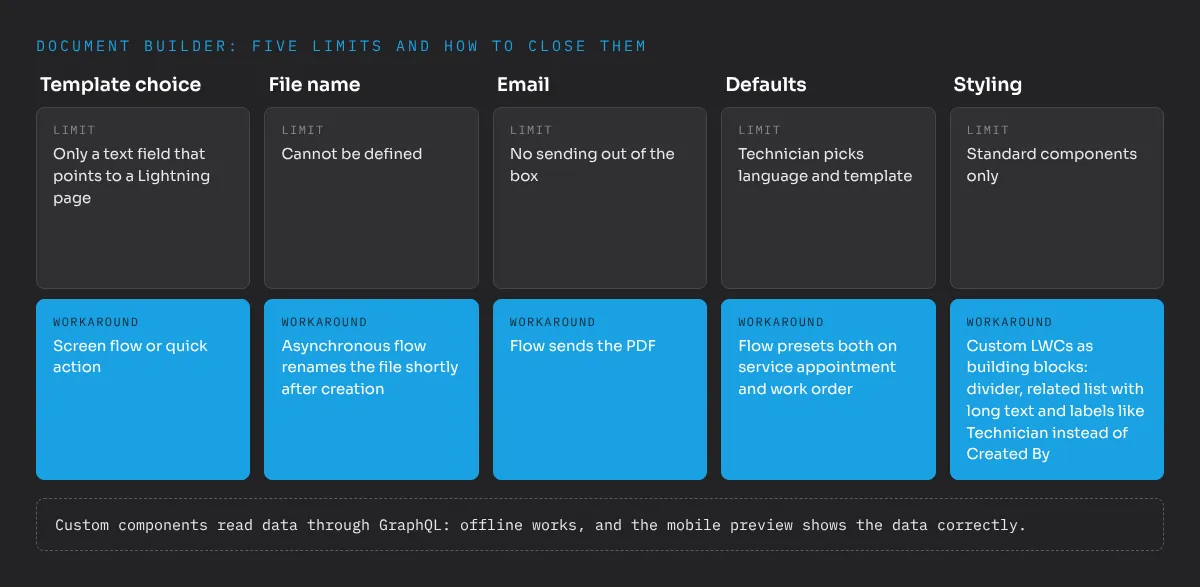
The Salesforce Document Builder creates the service report in Field Service with signature, photos and offline support, but in practice it has five limits: picking a template is awkward, the file name is fixed, there is no email sending, nothing presets language and template, and the styling is basic. None of them is a reason to buy another tool. Each one can be closed with a flow or a small Lightning Web Component. This article shows how I solve them in my projects.
Why do the limits of the Document Builder matter?
In my first article on Service Documents I described what the Document Builder is, what it costs and when you need a document generation tool instead. The short version: for the service report on site it is the right choice, because it is included in the Field Service licence and works offline.
The official limits list covers technical boundaries such as 50 pages per document or three supported objects. What it does not cover are the gaps you only notice in the first test with technicians and the service office. They are small, but they decide whether users accept the report. A technician who has to search for the right template after every job, or a service office that renames every PDF by hand, will soon ask for the old paper form.
The good news: the Document Builder is built on the same platform as everything else in Salesforce. Flows and Lightning Web Components (LWC, the standard way to build custom user interface components) can close every one of the five gaps without an additional licence.
Limit 1: Which template should the technician pick?
The template on the work order and the service appointment is only a text field. It refers to the Lightning page (FlexiPage) that holds the template layout. For a technician, that is a technical value without meaning. If you have several templates, for example one per job type or per country, users pick the wrong one or none at all.
Workaround: Put the choice behind a screen flow or a quick action. The flow shows a short list with readable names, such as “Annual maintenance” or “Repair with spare parts”, and writes the right value into the field. Even better is to filter the list by the job, so the technician only sees templates that fit the work type of the order.
Limit 2: Why can’t I choose the file name?
The Document Builder names the generated file itself. You cannot define a pattern like work order number, customer and date. For the service office this is annoying, because the PDF ends up in the customer’s mailbox, in the ERP or in a document archive, and nobody can tell from the file name which job it belongs to.
Workaround: A record-triggered flow with an asynchronous path. It starts when the document has been created and renames the file shortly afterwards. It has to run asynchronously, shortly after creation, so the file already exists when the flow renames it. The naming rule then lives in one place and can be changed by an admin without code.
Limit 3: How do I send the service report by email?
Out of the box, the Document Builder does not send the document. The technician creates the PDF, the customer signs, and then the report sits on the work order. In most service organisations the customer expects the report by email the same day, often as a basis for the invoice approval.
Workaround: A flow that starts when the document is complete and sends it as an attachment. You decide in the flow who gets it, for example the contact on the work order or a central service address of the customer, which email template is used and in which language. Combined with limit 2, the email arrives with a file name the customer can file away.
Limit 4: Can language and template be preset?
Yes, by flow. By default, the technician picks the template and the language when creating the document. That is one more step on site and one more chance for a mistake, for example a German report for a customer in France.
Workaround: Set both fields on the service appointment and the work order with a flow. The language can come from the account or the service territory, the template from the work type or the asset. The technician then only checks the preview and collects the signature.
Limit 5: How far can you get with styling?
The standard components cover fields, tables, images and signatures. Anything beyond that, such as a horizontal line between sections or a different related list, is not available. And some limits from the official list hit the report directly: long text fields cannot be shown in related lists, and the field labels are the ones from the data model.
Workaround: The template is a Lightning page, so it is built from components like building blocks. Custom LWCs can be added plug and play next to the standard components. Two examples from my projects:
- Graphic elements. A horizontal divider or similar visual separators between sections. Small, but the report looks like a designed document instead of a data dump.
- Your own related list. A component that also shows fields with more than 255 characters, for example the technician’s work description, and that overrides field labels just for the report. The standard field “Created By” can then appear as “Technician” in the document, without changing the label in the whole org.
Salesforce points out that LWCs for service documents need their own print styling, as described in the developer guide for custom components in service documents (opens in a new tab). Components from the mobile app cannot simply be reused. Plan them as their own small library.
Do the workarounds work offline?
The main argument for the Document Builder is offline creation at the customer’s machine, so the workarounds must not break it. In practice they don’t. Custom components read their data through GraphQL (the query interface that the Field Service mobile app uses for offline data), so the data is available on the device without a connection. The preview in the mobile app shows the information correctly, including the custom related list and the overridden labels.
The flows in limits 2 and 3 run on the server after the next sync. That is the right place for them: the technician does not wait for the email on site, and the renamed file and the email follow as soon as the device is online again. The flows for limit 4 can run when the dispatcher plans the job, so the values are on the device before the technician leaves.
What I recommend for a rollout
- Plan the five topics into the first sprint. They are small, but they belong to the definition of done for the service report, not to a later phase.
- Keep the flows in one place. One flow for defaults, one for renaming and email. Then an admin can find and change the rules.
- Build the LWCs as a small library. Divider, related list, maybe a header with the logo. Reusable in every template.
- Test offline with real devices. Including the preview, on iOS and Android, before the first technician goes live.
If you are planning a Field Service rollout and want to get the service report right from the start, look at my services or send me a message.
Frequently asked questions
Can I choose the file name of a Salesforce Service Document?
Not in the Document Builder itself. A record-triggered flow with an asynchronous path can rename the file shortly after it was created, for example to work order number, customer and date.
Can the Document Builder send the service report by email?
Not out of the box. A flow that starts when the document is created can send the PDF to the customer contact, with the email template and the recipient logic you define.
How do technicians pick the right Document Builder template?
The template is stored as a text field that refers to a Lightning page, which is hard to use directly. Preset it by flow on the work order and service appointment, or offer a screen flow or quick action that shows only the templates that fit.
Do custom Lightning Web Components in Document Builder templates work offline?
Yes, if they read their data through the GraphQL wire adapter. In my projects the offline mode then works reliably, and the preview in the Field Service mobile app shows the data correctly.