Salesforce Field Service mobile: guided work and voice
Salesforce has announced three new capabilities for the Field Service mobile app: guided workflows that adapt to the situation on site, a headless setup that turns paper forms into digital forms, and voice input that fills forms from what the technician says. For manufacturers with their own field service this addresses an old problem. Technicians spend too much time on paperwork, and the back office receives incomplete or late data. The features sound promising, but their value depends on the data model, the integration with the ERP and a few questions that are specific to companies in Germany.
What exactly did Salesforce announce?
On 20 October 2026 Salesforce described the new capabilities in a blog post on guided mobile work (opens in a new tab):
- Guided Experience. The app gives technicians step-by-step guidance on what to do next. When conditions change, for example when a technician marks something as urgent, the guidance adapts: relevant steps and questions appear, irrelevant ones disappear. Documentation prompts come up at each step, so data is captured during the job instead of afterwards.
- Headless setup. Digital forms can be created from existing paper forms or from existing mobile flows, with the same data fields. Salesforce describes it as being as easy as taking a picture. The goal is to avoid long projects just to digitise a form.
- Voice to Form. Technicians describe what they see or do, and the system interprets the speech and fills the right fields. Forms adjust dynamically to what is said. According to Salesforce, several languages are supported.
Salesforce backs this with its own research: field workers estimate that about 18 percent of their working time, more than seven hours a week, goes into administrative tasks. 43 percent of the organisations surveyed still use paper logs in the field, and only 16 percent say their field and back-office technology work together on one platform.
One limitation: the announcement shows demos, but does not state availability, editions or licences. Before planning a rollout, check the release notes and talk to your account team.
Why does this matter for manufacturers?
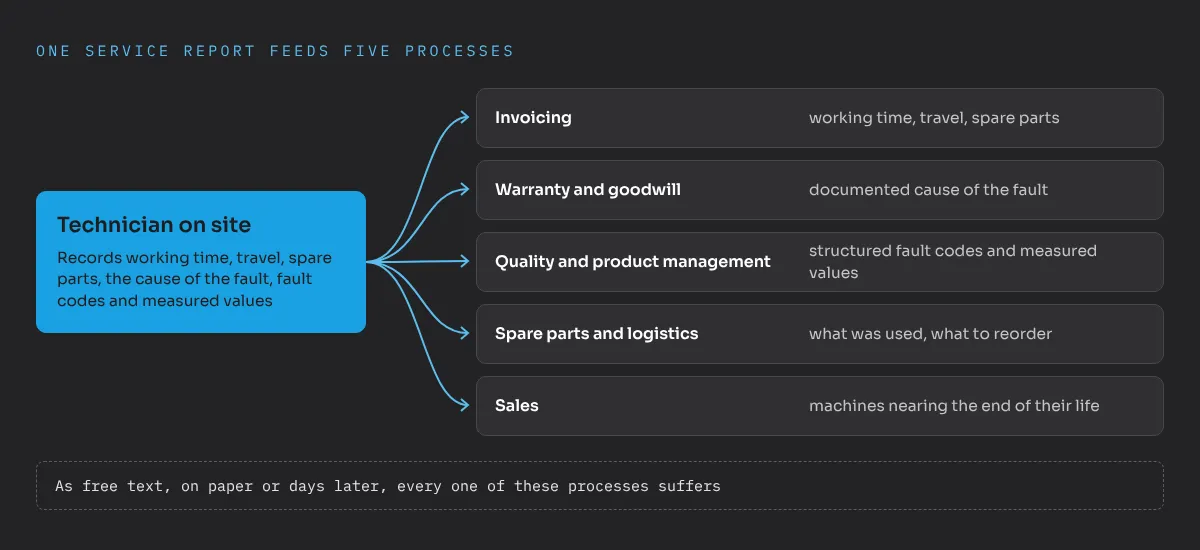
In manufacturing, field service is often where the customer relationship is decided. Technicians install machines, carry out maintenance, repair breakdowns and inspect equipment. What they record on site feeds several processes at once:
- Invoicing, based on working time, travel and spare parts.
- Warranty and goodwill decisions, based on the documented cause of a fault.
- Quality and product management, which need structured fault codes and measured values to see patterns across the installed base.
- Spare parts and logistics, which need to know what was used and what has to be reordered.
- Sales, which learns from service reports where a machine is nearing the end of its life.
When this information arrives as free text, on paper or days later, every one of these processes suffers. Guided workflows and voice input aim at exactly this point: better data, captured during the job, with less effort for the technician.
Where do guided workflows help most?
Guided workflows make the biggest difference where jobs vary and mistakes are expensive:
- Inspections and safety checks, where the required checks depend on the machine type, the country or the result of a previous step.
- Complex repairs, where the scope changes on site and additional questions have to be documented, for example about safety or customer approval for extra work.
- New or less experienced technicians, who benefit from guidance that experienced colleagues carry in their heads.
The prerequisite is that the logic behind the guidance is well defined. Someone has to decide which steps apply to which asset, which values are mandatory and which results trigger follow-up actions. That is process and data work, and it belongs to the service organisation, not only to IT.
What is the catch with digitising paper forms quickly?
The headless setup promises to turn a paper form into a digital one in very little time. That is useful, because many service organisations have dozens of protocols and checklists that never made it into the system.
But a fast digital copy of a form is only as good as the form itself. Typical problems I would check first:
- Fields without a clear meaning, such as a free text field “remarks” that contains half the relevant information.
- Duplicate data, where the form asks for information that already exists on the asset or work order.
- Missing structure, for example fault descriptions as free text instead of codes that quality management can evaluate.
- Forms that differ by region or team for the same job.
Before forms are digitised at scale, it is worth deciding on a target data model for service protocols: which values are captured as fields, which picklists are shared, how results link to the asset and the work order. This is classic architecture work, and it decides whether the data can be used later for reporting, AI agents or integration with the ERP.
What needs to be clarified before using voice input?
Voice input is attractive for technicians who work with gloves, at height or in noisy environments. For companies in Germany, three questions need answers before a pilot:
- Data protection. Speech is personal data. Clarify where it is processed and stored, for how long and for which purpose. The data protection officer should be involved early.
- Works council. Where a works council exists, it will usually have a say when a system processes employees’ speech and could be used to monitor performance. Involving it early saves months later.
- Language and environment. Test the supported languages and dialects with real technicians in real conditions, including noise. Technical terms and product names are the hardest part.
It also makes sense to define which fields may be filled by voice and which values the technician has to confirm, for example measured values relevant to safety.
How should you introduce the new features?
A pragmatic order for a manufacturer with field service:
- Confirm availability and licences for your org and editions.
- Pick one job type with high volume and a clear protocol, for example annual maintenance of a common machine type.
- Clean up the data model for this job type: asset data, mandatory values, fault codes, link to spare parts.
- Build the guided workflow with the service organisation and test it with technicians from different experience levels.
- Pilot voice input separately, after data protection and works council have agreed.
- Measure the effect: time spent on documentation, completeness of reports, time until invoicing.
Good field service data is also the foundation for AI agents in service, which need reliable information to work with, as I explain in why Agentforce needs business value and data quality first. If you are planning to modernise your field service on Salesforce, send me a message.
Frequently asked questions
What is new in the Salesforce Field Service mobile app?
Salesforce announced a guided experience with step-by-step guidance that adapts to the job, a headless setup that creates digital forms from paper templates or existing mobile flows, and voice to form, which fills form fields from spoken input.
When are the new Field Service mobile features available?
The announcement from 20 October 2026 does not state availability, editions or licences. Check the release notes and your account team before you plan a rollout.
How do manufacturers benefit from guided workflows in field service?
Technicians get the right checks and questions for the actual situation, documentation happens during the job, and the back office receives complete, structured data for invoicing, warranty and quality analysis.
What should be considered before using voice input for technicians?
Clarify data protection, storage and purpose of the speech data, involve the works council where one exists, test the supported languages with real technicians and define which fields may be filled by voice.